

SBOM analysis
Pass --sbom for SBOM analysis. Trowl draws the dependency graph, checks every package against the files in the image, and reads the component list for CVE analysis.
Supported formats
Section titled “Supported formats”| Format | Accepted as |
|---|---|
SPDX 3.0 |
One JSON-LD file |
SPDX 2.2 |
IMAGE.spdx.tar.zst, a plain tar, a directory of documents or one JSON file |
CycloneDX |
One JSON file, plus an optional VEX file |
How Trowl reads each format
Section titled “How Trowl reads each format”Each reader follows the layout produced by the build tools it was tested with. SBOMs from other tools also load, but missing fields may limit the detail Trowl can show.
SPDX 3.0
Section titled “SPDX 3.0”Tested with Yocto Wrynose (create-spdx-3.0), which writes one JSON-LD graph for the image. VEX comes from recipes patched or marked in CVE_STATUS , and sbom-cve-check.
| Element | Trowl uses it for |
|---|---|
software_Package |
Recipes and binary packages with their CPE and PURL. Yocto’s /recipe/ and /package/ ids set the role, otherwise software_primaryPurpose and generates |
software_File |
File paths and SHA-256 for the presence check |
generates dependsOn |
Recipe-to-package edges, and runtime or build dependencies by scope |
security_Vulnerability |
The CVEs the SBOM lists for each component |
security_Vex*VulnAssessmentRelationship |
The Fixed, NotAffected, Affected and UnderInvestigation types become statuses, and security_statusNotes their notes. A “fixed in” or “backported in” version fills the Fixed in column |
security_CvssV*VulnAssessmentRelationship |
The highest v2, v3 and v4 score per CVE |
Each VEX relationship type gets mapped to a Trowl status in the report.
| SBOM status | Trowl status |
|---|---|
security_VexFixedVulnAssessmentRelationship |
Fixed |
security_VexNotAffectedVulnAssessmentRelationship |
Not affected |
security_VexAffectedVulnAssessmentRelationship |
Affected |
security_VexUnderInvestigationVulnAssessmentRelationship |
Under investigation |
SPDX 2.2
Section titled “SPDX 2.2”Tested with Yocto Scarthgap (create-spdx-2.2), which writes a document for each recipe and package, bundled as IMAGE.spdx.tar.zst.
These documents only list fixed CVEs. Trowl finds the others through version matching.
| Element | Trowl uses it for |
|---|---|
packages |
Recipes, images and binary packages with their CPE and PURL. Yocto’s SPDXRef-Recipe- and SPDXRef-Image- ids set the role, and packages from other tools count as binary packages |
files |
File paths and SHA-256 for the presence check |
GENERATED_FROM |
Recipe-to-package edges |
RUNTIME_DEPENDENCY_OF DEPENDS_ON |
Runtime dependencies between packages |
BUILD_DEPENDENCY_OF |
Build dependencies between recipes |
sourceInfo |
The recipe’s CVEs fixed: list, which becomes Fixed |
SPDX 2.2 has no VEX, so the patched list is the only status Trowl takes from it.
| SBOM status | Trowl status |
|---|---|
CVEs fixed: in the recipe’s sourceInfo |
Fixed |
Userland CVEs found by version match are marked as Affected, while kernel CVEs get VEX with --kernel-tree.
CycloneDX
Section titled “CycloneDX”Tested with Buildroot (make generate-cyclonedx) and Yocto’s meta-cyclonedx which writes separate SBOM and VEX files.
Neither tool lists files under its components, so Trowl skips presence checks for these SBOMs.
| Element | Trowl uses it for | Generated by |
|---|---|---|
components |
One component per package with its CPE and PURL | Both |
scope: excluded |
Marks the component Build-time only | Buildroot (host tools) |
dependencies |
Edges between components | Both |
pedigree.patches |
CVEs a patch resolves, which become Fixed | Buildroot |
vulnerabilities |
CVE statuses from each analysis.state. A GHSA entry uses its first CVE reference |
Buildroot in the SBOM, Yocto in its VEX file |
type: file components nested in a component |
File paths and SHA-256 for the presence check | Other tools |
Trowl maps each analysis.state whether it comes from the SBOM or a separate VEX file.
| SBOM status | Trowl status |
|---|---|
resolved resolved_with_pedigree |
Fixed |
not_affected false_positive |
Not affected |
exploitable |
Affected |
in_triage |
Under investigation |
Separate VEX files
Section titled “Separate VEX files”Pass separate CycloneDX JSON VEX files (e.g. Yocto’s meta-cyclonedx) via --vex. Like any VEX file, its statuses override the SBOM’s and Trowl’s kernel verdicts.
meta-cyclonedx writes the build’s cve-check results to this file. Add --override so Trowl’s kernel check can still clear kernel CVEs whose code isn’t built.
trowl scan image.rootfs.ext4 --sbom bom.json --vex vex.json --kernel-tree linux --override -o reportSBOM linking
Section titled “SBOM linking”A VEX file names components by BOM-Link, so Trowl needs the SBOM’s serialNumber and version to resolve them. Each affects ref takes the form urn:cdx:<serial>/<version>#<bom-ref>.
"serialNumber": "urn:uuid:1111…5555","version": 1,"components": [{ "bom-ref": "openssl", "name": "openssl", "version": "3.5.4" }]{ "id": "CVE-2025-1001", "analysis": { "state": "resolved", "detail": "Fixed from version 3.5.4" }, "affects": [{ "ref": "urn:cdx:1111…5555/1#openssl" }]}The analysis.state maps to a Trowl Fixed status through the table above, and justification and detail become the status notes.
Skipped and refused statements
Section titled “Skipped and refused statements”Trowl skips a ref that points at another serial or version, or at a bom-ref the SBOM doesn’t list. The scan log counts them as “skipped for another BOM or component”.
Trowl refuses the whole file when:
- the SBOM has no
serialNumber - a statement has no
id, noaffectsor noanalysis - an
analysis.stateis missing or isn’t a CycloneDX state - no statement reaches this SBOM, which means the VEX belongs to another build
Precedence
Section titled “Precedence”A CycloneDX SBOM can carry its own vulnerabilities, so the SBOM and the VEX file may both state a status for the same CVE on the same component. Trowl reads the SBOM first and then applies the VEX file, so the VEX status wins.
This follows how the two files are used. The SBOM is fixed when the image is built. The VEX file is where CVE analysis is recorded, and it can be updated after triage without rebuilding the image. When the two disagree, the VEX file is the more recent statement.
A VEX statement for a CVE the SBOM doesn’t list adds that CVE to the component with the VEX status.
Dependency graph
Section titled “Dependency graph”The toolbar shows the detected format and lets you choose a Layered, Radial or Force layout. Show selects components, packages or both. Status hides selected presence states. Large SBOMs initially show components to keep the graph readable.
Switch to Table view for the same nodes and relationships if the graph is too dense.
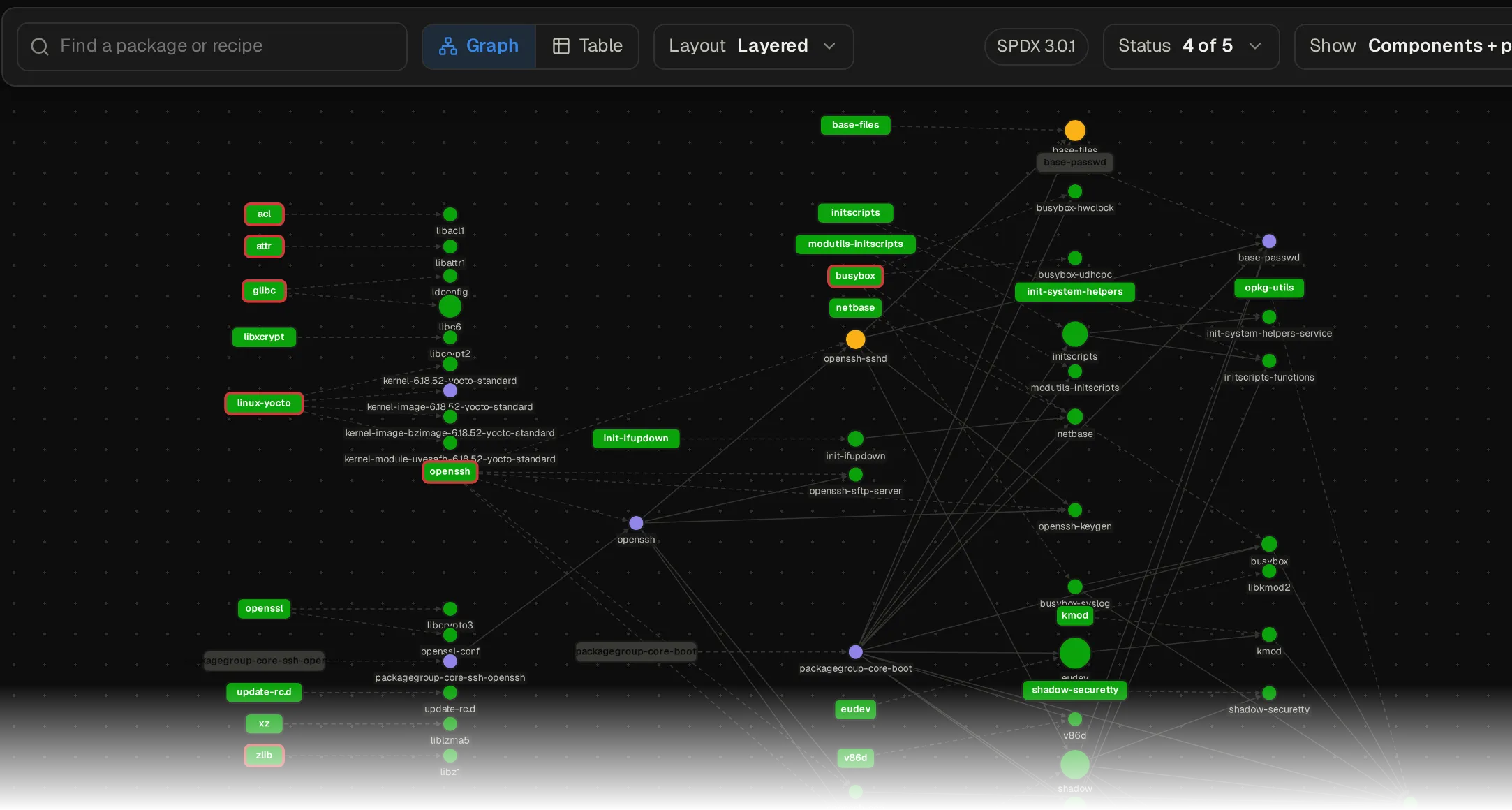
What the graph shows depends on the format:
| Format | Nodes | Edges |
|---|---|---|
SPDX 3.0 SPDX 2.2 |
Recipes as pills and binary packages as circles sized by file count | Dashed lines from each recipe to the packages it builds. Solid lines for runtime dependencies. |
CycloneDX |
One node per component, since there are no recipes | The dependencies list |
Table lists the same nodes, relationships and metadata. Use it when the graph is too dense.
Packages against files
Section titled “Packages against files”Trowl checks each package’s declared files against the image by path and SHA-256. The results appear in the SBOM Analysis table’s Status column and as fill colours in the graph.
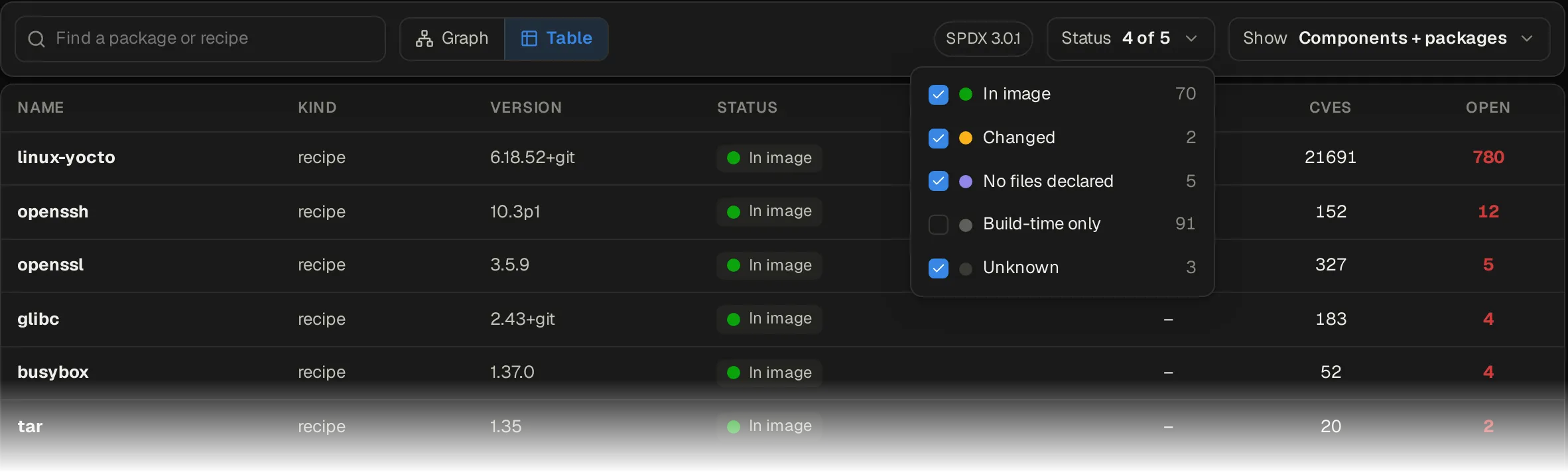
| Status | Meaning |
|---|---|
In image |
Every declared file is present, or its hash matches. |
Changed |
Every file is present, but their hashes don’t match. |
Partial |
Some declared files are missing. |
Not in image |
None of the declared files are present. |
No files declared |
The SBOM lists no files for the package, so there is nothing to compare. |
Build-time only |
A recipe with no output packages, or a CycloneDX component scoped excluded. |
Unknown |
A recipe whose packages can’t be judged either way. |
A recipe counts as shipping when any of its packages is In image, Changed or Partial. Symlinks count as present. Packages whose files all sit under /boot aren’t marked missing when the image has other partitions, because the boot partition may simply not be in the scanned image.
The dashboard’s Overview section shows how many packages changed or lost files.

If the SBOM declares no files, as with Buildroot, the row reports that presence checks were skipped.
SBOM for CVE analysis
Section titled “SBOM for CVE analysis”Trowl uses the SBOM’s CVE information and VEX statuses, then adds its own findings with supporting evidence.
What Trowl adds
Section titled “What Trowl adds”- CVE matching. Trowl matches CVEs to the SBOM’s recipes, or to its packages if there are no recipes. See Matching.
- Additional CVEs. Version matching finds CVEs the SBOM doesn’t list, often published after the build. A
*after the CVE ID marks these findings. - Statuses for CVEs the SBOM leaves blank. When the SBOM lists a CVE without a status and its version is in range, Trowl marks it Affected without the
*. The detail panel shows Unknown from the SBOM under Trowl’s Affected. - Shipping status. Presence checks set the Shipped column. Affected CVEs on packages that don’t ship are counted separately.
- Kernel verdicts. With
--kernel-tree, Trowl re-checks the SBOM’s kernel CVE statuses against the config. A differing verdict adds a yellow≠to the status and includes the CVE in the Disagreements filter. - Name-only matches. If the SBOM’s CPE has no vendor, the match relies on the product name alone and may refer to another project. The CVE ID appears in yellow, like
CVE-2026-12345. - Kernel version. The scan stops if the SBOM’s kernel release doesn’t match
/lib/modulesin the image. The SBOM probably belongs to a different build.
What Trowl leaves alone
Section titled “What Trowl leaves alone”- Userland statuses. Trowl keeps the SBOM’s Fixed and Not affected statuses, even for packages that don’t ship. Only kernel CVEs receive a VEX verdict from Trowl.
- Fixed kernel CVEs. Kernel checks never override Fixed.
- PURLs. Trowl reads and displays them, but uses CPEs for matching.
- Unlisted files. Trowl doesn’t list image files that no SBOM package declares. Code vendored into another package isn’t visible either.